


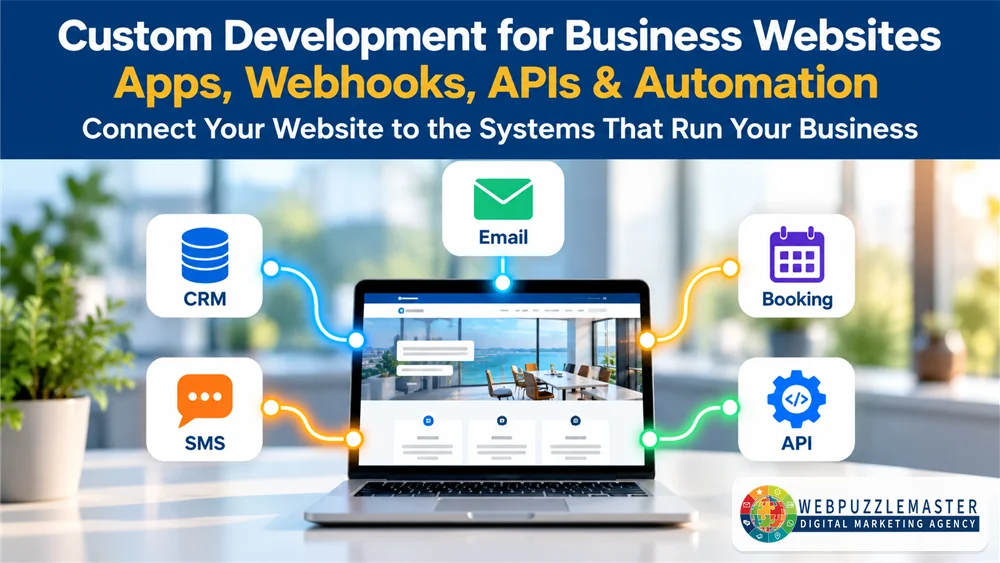
Most business websites are built from the same ingredients: a theme, a page builder, a contact form and a stack of plugins. That works well until the business needs the website to do something specific, such as sending a qualified lead straight into the CRM, starting the right follow-up automatically, connecting a booking system to a sales pipeline, or delivering a personalized report. Custom development for business websites fills that gap. It connects the website to the systems the business already runs on, so information moves on its own instead of being copied by hand.
This article is for small and midsize business owners and marketing leaders whose websites look fine but act like islands. You’ll learn what apps, webhooks, APIs and automation integrations actually do, when custom work is worth it and when it isn’t, and how to plan integrations that hold up as your marketing, CRM and AI tools change.
Key Takeaways
What You’ll Learn:
- Why off-the-shelf plugins often stop short of what a growing business needs, and where that gap shows up as lost leads and manual work.
- How APIs, webhooks, custom apps and automation platforms work together to move data between your website, CRM, email, SMS and other tools.
- How to decide between configuring existing tools, using a no-code connector, or building custom functionality.
- The most common integration mistakes, including fragile chains of connectors, duplicate data and missing error handling.
- Why clean, connected data matters for AI-powered marketing, and how custom integrations support it. If your forms still feed an inbox instead of a CRM, start with connecting WordPress forms to CRM and automation for seamless lead flow.
When a Template Website Stops Being Enough
Templates and plugins are a sensible starting point. They are affordable, fast to launch and well supported. The trouble starts when the business grows into needs the plugin authors never anticipated.
It usually shows up in small, expensive ways:
- A form submission lands in an inbox, and someone has to retype it into the CRM.
- Leads from different pages all look the same, so nobody knows which offer or campaign produced them.
- Appointment bookings, payments and inquiries live in separate systems that never share information.
- The team pays for three tools that each do part of a job and none of which talk to the others.
- A plugin update breaks a workflow, and nobody notices until leads stop arriving.
For local service businesses, professional firms and growing B2B companies, these gaps are not just technical annoyances. Every manual handoff adds delay, and delay is where leads go cold. Every disconnected system makes reporting less reliable, so marketing decisions rest on partial information.
The issue matters more now because customer journeys have become longer and more connected. A prospect might find you through AI search, visit the website twice, download a guide, receive an email, reply to a text and book a call. If your website can’t pass what it learns along to the rest of your systems, every later step starts from zero. A website built for performance, conversion and integration treats the site as the front door to the business system, not just a brochure.
How Apps, APIs, Webhooks and Automation Integrations Work Together
Custom development isn’t one thing. It is a set of building blocks, and the right solution usually combines several of them.
APIs: The Way Systems Ask Each Other for Information
An API (application programming interface) is a published set of rules that lets one system request or send information to another. When your website checks appointment availability, creates a contact in your CRM or pulls reviews from a review platform, it is usually using an API. Good APIs are documented and secured with keys or tokens, and they let you control exactly which data moves.
Webhooks: Instant Notifications When Something Happens
A webhook is a message one system sends automatically when an event occurs, such as “a form was submitted,” “a payment succeeded” or “an appointment was booked.” Instead of checking for changes every few minutes, the receiving system hears about it right away. Webhooks are what make fast follow-up possible, because the next step can start within seconds.
Automation Platforms and CRMs: Where Rules Live
Once data arrives, something has to decide what happens next. CRM and automation platforms apply tags, start email or SMS sequences, assign tasks and update records based on rules you define. Connecting the website to CRM and automation systems that turn website activity into organized follow-up is often the single most valuable integration a business can make.
Custom Apps and Plugins: Functionality That Doesn’t Exist Yet
Sometimes the tool you need doesn’t exist, or the available options are too limited or too expensive. That is when custom applications, WordPress plugins, admin dashboards or calculators make sense. Examples include an assessment that scores answers and delivers tailored results, a quote builder, a member portal, or a plugin that sends targeted SMS messages to interest-based subscriber lists.
How the Pieces Fit
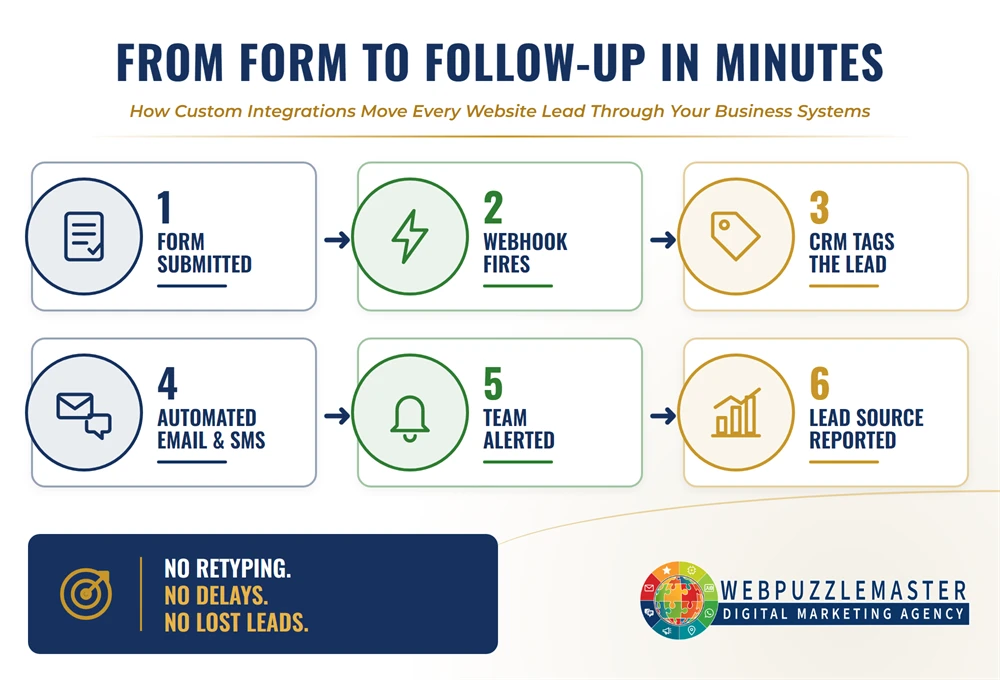
A typical connected flow looks like this: a visitor completes a qualifying form, a webhook sends the submission to the CRM, the CRM applies tags based on the answers, an automation sends the right email or text, a task alerts the team for high-value leads, and reporting records which page and campaign produced the result. Each piece is simple. The value comes from the connections.
Why Connected Websites Matter for AI and Search
Integration also affects how well a business can use AI and how clearly it presents itself to AI-powered search.
AI tools for personalization, lead scoring, chat and reporting depend on clean, structured information. If customer data is scattered across inboxes, spreadsheets and disconnected apps, AI has little reliable material to work with. Integrations that capture consistent fields, tag contacts by interest and record where leads came from create the foundation that AI-powered marketing needs.
The same discipline helps on the visibility side. Custom development can generate structured data from business information, keep service and location pages consistent with your Google Business Profile, and make sure important content is accessible to search crawlers instead of hidden behind scripts. This is part of AI Visibility Engineering™, which helps search and AI systems understand what your business does and who it serves.
Practical Application: Rebuilding a Lead Funnel Around Connected Systems
Webpuzzlemaster recently went through this process on its own website.
The situation. Over several years, the site’s lead flows had grown piece by piece. Website forms were built in Gravity Forms, some submissions were passed to an outside automation service through webhooks, email marketing ran on a separate platform, and appointment scheduling ran on yet another tool. Each part worked, but the chain had several handoffs, and when one platform was retired, some connections were left pointing at nothing.
What we did. We mapped every form, the page it lived on, its thank-you page, the tag it should apply and the automation it should start. We then consolidated forms, tagging, email, scheduling and follow-up into a single CRM and automation platform. For the AI-Powered Ad Strategy Blueprint, for example, the new form tags each contact as a blueprint download, triggers a delivery email, and routes qualified prospects to a pre-qualification step before they can book a strategy session. Retired webhooks were switched off instead of being left running.
Why this approach. Fewer handoffs mean fewer places for leads to get lost. A documented form-to-tag-to-automation map makes it possible to test every path and to change one piece without breaking another.
The lesson for your business. Before adding another tool or connector, document what already exists. Many integration problems are not solved by more technology. They are solved by removing unnecessary steps and making the remaining connections explicit and testable.
Common Integration Mistakes That Cost Businesses Leads
- Stacking connectors without a map. A form sends to a connector, which sends to a spreadsheet, which triggers another tool. When one link breaks, nobody knows where to look.
- No error handling or monitoring. Webhooks fail silently when a password changes, an API key expires or a platform updates. Without alerts, lost leads go unnoticed for weeks.
- Duplicate and inconsistent data. The same person exists three times in the CRM with slightly different names, so automations misfire and reports overcount.
- Building custom when configuration would do. Custom code carries maintenance costs. If a well-supported tool already does the job, configure it instead.
- Configuring when custom is needed. The reverse is also costly. Forcing a plugin to do something it wasn’t designed for leads to workarounds that break during updates.
- Ignoring security and privacy. API keys stored in plain text, forms that collect more data than necessary and integrations without access controls create real risk.
- Forgetting the customer. An integration that works technically but sends a generic message, or none at all, still loses the lead. For local businesses especially, fast, consistent follow-up that builds local customer trust matters as much as the technology behind it.
What a Well-Integrated Business Website Looks Like
A successful approach to custom development for business websites starts with the business process, not the technology. Map how a lead should move from first visit to customer, then choose the simplest reliable way to connect each step.
In a well-integrated setup:
- Every form has a documented purpose, destination, tag and follow-up path.
- New leads receive an appropriate response within minutes, and high-value leads alert a person.
- Contact records capture source, interest and stage consistently, so segmentation and reporting are reliable.
- Custom functionality is built only where it creates a clear advantage, and it is documented and maintained.
- Integrations are tested after every major website, plugin or platform update.
- Reporting shows which pages, offers and campaigns produce qualified leads, not just traffic.
The operational payoff is less manual data entry, fewer missed follow-ups and a team that trusts its numbers. The growth payoff is faster response, better-targeted communication and a data foundation that AI tools can actually use. Over time, the website becomes an asset that improves with each campaign instead of a fixed expense.
Frequently Asked Questions
1. What is custom development for business websites?
It is the design and building of website functionality that goes beyond standard themes and plugins, such as integrations with CRMs and other platforms, custom forms and calculators, dashboards, plugins and automated data flows tailored to how a specific business operates.
2. What is the difference between an API and a webhook?
An API lets one system request or send information to another when asked. A webhook is an automatic notification one system sends to another when a specific event happens, such as a form submission or payment.
3. Do small businesses really need custom development?
Not always. Many needs can be met by configuring existing tools well. Custom development makes sense when manual work, lost leads or tool limitations are costing more than a tailored solution would.
4. Can I connect my WordPress website to my CRM?
Yes. Most modern CRMs offer native forms, plugins, APIs or webhooks that let WordPress forms create and update contacts, apply tags and start automations.
5. Are no-code automation tools a good alternative to custom code?
They can be an excellent option for straightforward workflows. They become harder to manage when chains grow long, volumes increase or the logic becomes complex, so they should still be documented and monitored.
6. How do integrations improve lead follow-up?
They remove the delay between a prospect’s action and the business’s response by passing information automatically to the systems that send messages, assign tasks and track progress.
7. Will custom integrations slow down my website?
Well-built integrations usually run in the background and have little effect on page speed. Poorly built ones that load heavy scripts on every page can slow a site, which is why performance should be tested.
8. How do I keep integrations secure?
Use secure authentication, store credentials safely, limit the data collected and shared to what is necessary, keep software updated and restrict who can change integration settings.
9. What happens to my integrations when I change platforms?
Every connection that depends on the old platform must be identified, rebuilt or retired. A documented integration map makes migrations much safer and helps prevent orphaned workflows.
10. How does custom development support AI marketing?
AI tools rely on consistent, well-organized data. Integrations that capture structured information, tag contacts by interest and record lead sources give AI-powered personalization, scoring and reporting a reliable foundation.
Conclusion
Custom development for business websites is not about adding complexity. It is about removing the gaps between the website and the rest of the business, so that leads, information and follow-up move without manual effort or delay.
The most valuable integrations are often simple: a form that creates a properly tagged CRM contact, a webhook that starts follow-up within minutes, a dashboard that shows which campaigns produce real customers. Start by mapping how information should flow, remove steps that add no value, and build custom functionality only where it creates a clear advantage.
How Webpuzzlemaster Can Help
Webpuzzlemaster designs and builds WordPress websites, custom plugins, admin dashboards, API connections and CRM and automation integrations for growing businesses. We start by mapping your lead flow and existing tools, then recommend the simplest reliable way to connect them, whether that means configuring what you already have or building something new.
Our work connects all four pillars: the website and its performance, the CRM and automation behind it, local visibility and AI Visibility Engineering™. Because we have built our own products, including the eZ SMS Blaster and Ultimate WP Multimedia Gallery plugins for WordPress, we understand both the technical details and the business purpose of custom development. To see how integration fits into search and AI discovery as well, explore how search and AI visibility work together with your website.
About Ruth Kuttler
Ruth Kuttler, AI Visibility Engineer™ & Digital Strategy Architect, helps businesses connect their websites, marketing, CRM and automation into systems that support measurable growth. She has designed and developed custom WordPress plugins and integrations, and she approaches every technology decision by first understanding the business problem it needs to solve.
Learn more about Ruth Kuttler and Webpuzzlemaster’s approach to integrated digital growth.
Your Next Step: Find the Gaps in Your Website Systems
If your website collects leads but your team still copies information by hand, or you’re not sure what happens after someone fills out a form, it’s time to look at the whole system. A strategy consultation helps identify where information gets stuck, which integrations would make the biggest difference and whether custom development is worth the investment. Answer a few quick questions so we can make the most of the conversation.