

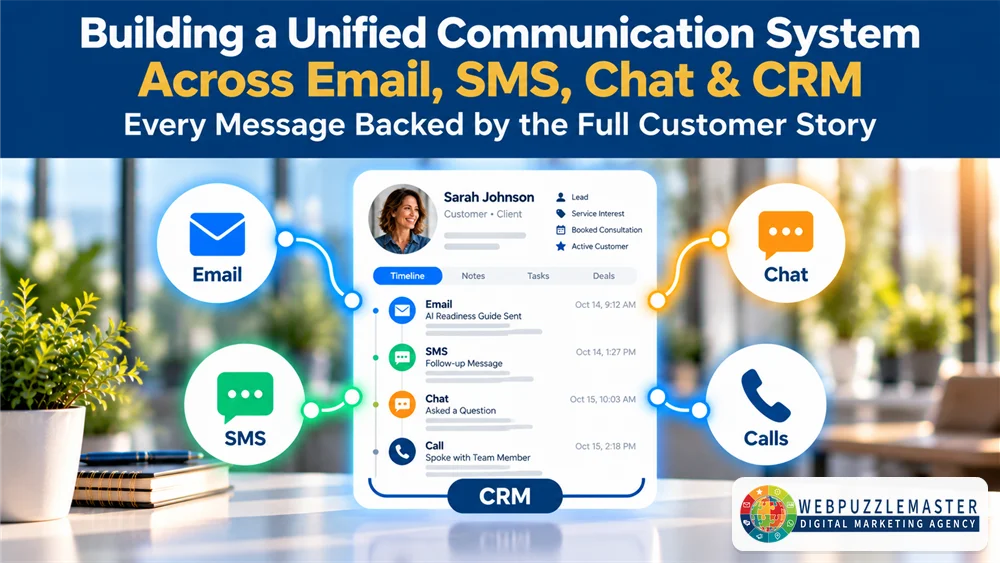
Most businesses don’t have a communication problem. They have too many disconnected communication tools. Email lives in one platform, text messages in another, website chat in a third and customer records in a CRM that only partly reflects what’s been said. A unified communication system brings these channels together so every message is sent with the full picture of who the customer is, what they’ve asked and what happens next.
This article is for owners and managers of service businesses, professional firms and growing companies whose teams juggle inboxes, phones, chat widgets and spreadsheets. You’ll learn why fragmented communication costs leads and customers, how email, SMS, chat and CRM fit together, and what it takes to build a system your team will actually use.
Key Takeaways
What You’ll Learn:
- How fragmented communication tools create slow responses, duplicate messages and lost context.
- The role each channel plays (email, SMS, chat) and why the CRM must sit at the center.
- How tags, triggers and shared conversation history keep messages coordinated across channels.
- Where AI fits, including chat qualification, personalization and summarizing conversations, and why it depends on clean data.
- How chat connects to the rest of the system, explored further in how website chat and messaging automation turn conversations into customers.
The Hidden Cost of Disconnected Communication Tools
Communication tools are usually added one at a time, each to solve an immediate need. An email platform for newsletters. A texting app for reminders. A chat widget because a competitor had one. A CRM because the spreadsheet got too big. Each tool works on its own. Together, they create gaps.
Those gaps show up as:
- Slow response. A chat message or text arrives when no one is watching that particular app.
- Lost context. The person returning a call doesn’t know the customer already explained the problem in chat and by email.
- Conflicting messages. A prospect who just booked a consultation still receives “Are you ready to schedule?” emails.
- Duplicate or missing records. The same person exists in three tools, and none has the full history.
- Unreliable reporting. Nobody can say which channel or campaign produced a customer.
- Team frustration. Staff spend time switching between apps and searching for information instead of helping customers.
The impact is greatest where speed and trust matter most: new inquiries, appointment-based services and high-value sales. Customers expect businesses to remember what they’ve said, and they notice when that doesn’t happen. As AI tools raise expectations for fast, personalized responses, disconnected systems make the gap more visible. Strong CRM and automation that keep every conversation connected close that gap.
How Unified Communication Works
A unified system isn’t necessarily one piece of software. It’s an arrangement in which every channel reads from and writes to the same customer record, and rules decide which message goes out, on which channel and when.
The CRM: The Single Source of Truth
The CRM holds each contact’s details, source, interests, stage, appointments and conversation history. Every channel should create or update this record. If information exists only inside an email platform or a texting app, it isn’t part of the system.
Email: Depth and Nurturing
Email works well for detailed information, educational sequences, confirmations, newsletters and documents. It’s ideal when the customer needs to read, compare or save something.
SMS: Speed and Action
Text messages are best for time-sensitive, short communication: inquiry confirmations, appointment reminders, quick questions, links to book or pay and review requests. SMS should be permission-based and used with restraint.
Chat: Real-Time Conversations
Website chat, Facebook Messenger, Instagram messages, Google Business Profile messaging and WhatsApp let customers ask questions when they have them. AI-assisted chat can answer common questions, collect qualifying details and book appointments, then hand the conversation to a person with a summary.
Tags, Triggers and Rules: The Coordination Layer
Tags record what you know about a contact, such as service interest, lead source, stage and preferences. Triggers respond to events like a form submission, a booked appointment, a link click or a reply. Rules make sure that when one thing happens, the rest of the system adjusts: a booking stops sales follow-up, a reply pauses automated messages, and a high-value inquiry alerts a person immediately.
Where AI Adds Value
AI can draft personalized messages, qualify leads through chat, summarize long conversations, suggest next actions and help prioritize follow-up. All of these depend on organized data. AI working from scattered, inconsistent records produces scattered, inconsistent results.
Practical Example: One Inquiry, Four Channels, No Gaps
Consider a home services company that receives inquiries through its website, Google Business Profile messages and phone calls.
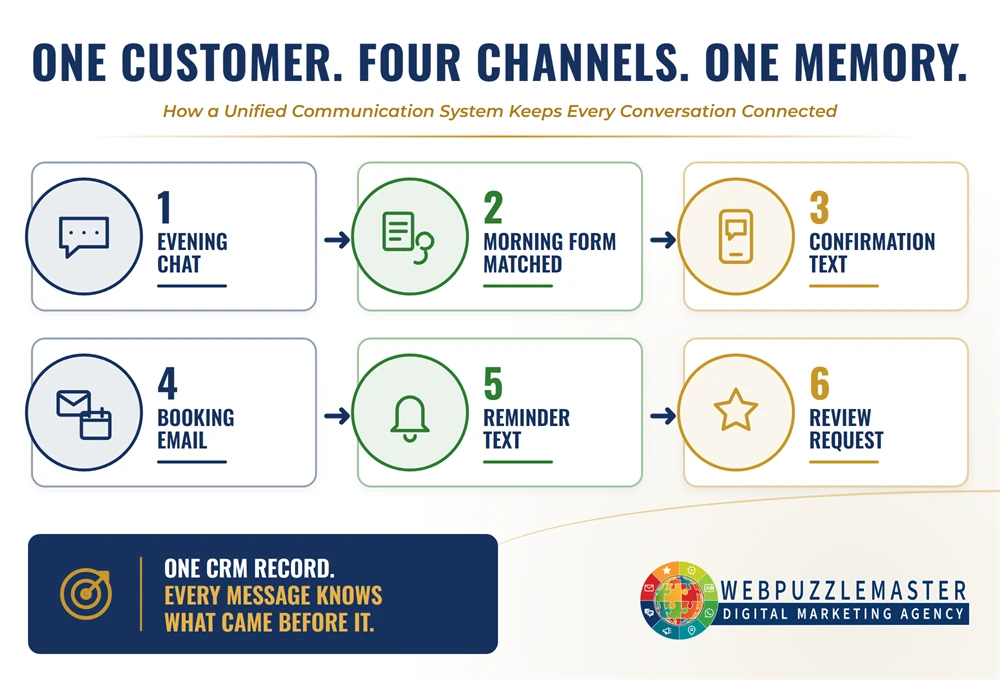
Before: Website forms went to a shared inbox, Google messages went to the owner’s phone, and reminders were texted manually. A homeowner who chatted in the evening, filled out a form the next morning and then called could reach three different people, none of whom knew about the other conversations.
A unified approach: All three entry points create or update a single CRM contact. The evening chat captures the service needed and the address, and a summary is saved to the record. The next morning, the form submission is matched to the same contact instead of creating a duplicate. An automated text confirms the request and offers booking times. When the homeowner books, a confirmation email goes out, sales follow-up stops automatically and reminders are scheduled by text. After the job, the system sends a thank-you email and a text asking for a review.
Why this approach works: Every channel does what it does best, and the CRM makes sure each message reflects what has already happened. The team sees one history instead of piecing it together.
The lesson: Unifying communication is less about adding channels and more about making sure they share one memory.
Common Mistakes When Connecting Email, SMS, Chat and CRM
- Buying an all-in-one platform without designing the process. Software doesn’t fix unclear rules about who responds, when and on which channel.
- Letting automations run on top of each other. Without stop conditions, contacts receive overlapping sequences from different campaigns.
- No duplicate management. Without matching rules on email and phone number, the same customer becomes several records.
- Overusing SMS. Too many texts, or texts without consent, quickly erode trust and can create compliance risk.
- Chat without handoff. A chatbot that can’t pass a conversation to a person, or doesn’t log what was said, frustrates customers.
- Ignoring the website’s role. Forms, chat and booking tools on the site must connect cleanly to the CRM. A website built to capture and route leads is the entry point for most of the system.
- Skipping training and ownership. If the team keeps using personal phones and inboxes, the unified system never becomes the single source of truth.
What Unified Communication Looks Like When It Works
When a unified communication system is working well, customers experience a business that is responsive, consistent and attentive, and the team experiences fewer interruptions and less searching.
- Every inquiry is acknowledged quickly, on the channel the customer used.
- Any team member can open a contact and see the full conversation history across email, SMS and chat.
- Automations pause or stop when a customer replies, books or buys.
- Messages are segmented by interest and stage, so they stay relevant.
- High-value or urgent leads reach a person immediately.
- Reviews, referrals and repeat business are requested at the right moments.
- Reporting connects messages and channels to appointments, sales and revenue.
The operational benefit is time saved and fewer mistakes. The growth benefit is higher conversion from the leads you already generate. Consistent, well-documented customer interactions also support how your business is perceived online, from reviews to the information AI systems use to understand and recommend your business.
Frequently Asked Questions
1. What is a unified communication system?
A unified communication system connects channels such as email, SMS, chat and phone to a shared CRM, so every message is based on the same customer record and coordinated by common rules.
2. Do I need one platform for everything?
Not necessarily. An all-in-one platform can simplify things, but separate tools can also work if they reliably share data with the CRM and follow the same rules.
3. Why should the CRM be at the center?
The CRM is where customer information, history and stage are stored. Placing it at the center ensures every channel works from the same, up-to-date information.
4. When should a business use SMS instead of email?
Use SMS for short, time-sensitive messages such as confirmations, reminders and quick questions. Use email for detailed information, education and documents.
5. Can chatbots be part of a unified system?
Yes. Chatbots can answer common questions, collect details and book appointments, as long as they log conversations to the CRM and hand off to a person when needed.
6. How do I prevent customers from receiving too many messages?
Set stop conditions, frequency limits and priorities so that replies, bookings and purchases pause or end other sequences, and avoid running overlapping campaigns to the same contacts.
7. How does AI improve customer communication?
AI can personalize messages, qualify leads, summarize conversations and suggest next steps. It is most effective when it works from clean, organized CRM data.
8. What permissions are needed for SMS marketing?
Businesses should obtain clear consent before sending marketing texts, provide an easy way to opt out and follow applicable regulations and carrier requirements.
9. How long does it take to unify communication channels?
It depends on the number of tools, the condition of existing data and the complexity of the process. Many businesses start with the highest-impact flows, such as new inquiries and appointments, and expand from there.
10. How do I measure whether a unified system is working?
Track response times, appointment rates, conversion rates by source, duplicate records, unsubscribe and opt-out rates, and the revenue connected to each channel.
Conclusion
Customers don’t care which app a message came from. They care that the business responds quickly, remembers what they said and makes the next step easy. A unified communication system makes that possible by connecting email, SMS and chat to a CRM that serves as the single source of truth.
Start with the conversations that matter most, usually new inquiries and appointments. Map how they should flow, connect each channel to the CRM and set rules that keep messages coordinated. Then build from there, using AI where clean data makes it genuinely helpful.
How Webpuzzlemaster Can Help
Webpuzzlemaster designs and implements CRM and communication systems that connect website forms, email, SMS, chat and appointment scheduling. We map your current tools and customer journeys, consolidate where it makes sense, build the tags, triggers and automations that coordinate messages, and connect everything to reporting.
Our approach connects the CRM and automation pillar with website performance, local business success and AI Visibility Engineering™, because communication works best when it is part of the whole growth system. We have rebuilt our own forms, tagging and follow-up on a unified CRM, and we developed eZ SMS Blaster for WordPress, so we bring hands-on experience with both the strategy and the technology. For local businesses, unified communication also strengthens the reviews, responsiveness and reputation that drive local growth.
About Ruth Kuttler
Ruth Kuttler, AI Visibility Engineer™ & Digital Strategy Architect, helps businesses connect CRM, automation, messaging and websites into systems that respond faster and convert more of the leads they already have. She brings a strategy-first approach, choosing technology only after understanding how the business and its customers actually communicate.
Learn more about Ruth Kuttler and Webpuzzlemaster’s approach to integrated digital growth.
Your Next Step: Connect Your Ads to the Rest of Your System
If you advertise, or plan to, connected communication is what turns ad clicks into booked appointments. The free AI-Powered Ad Strategy Blueprint shows which ad platforms fit your industry, what leads realistically cost and how chat, CRM, email and SMS follow-up work together after the click. Use it to plan advertising that connects to the system you’re building.